Doc Engine & Quasar UI · Active Production · Proprietary
Documentation Engine – Automated Helpdesk Document Generator
Engineered a dedicated 3-pane documentation preview engine in Quasar (Vue 3), converting raw ticket threads into publication-grade documents with dynamic DOM-scanned Table of Contents and safe HTML parsing.
Overview
Engineered the frontend document preview system for Docstach using Quasar Framework (Vue 3) and TypeScript [X], transforming raw ticket thread data and automated responses into structured, publishable documentation [Y] by building a dedicated 3-pane viewport layout with recursive navigation, a dynamic DOM-scanned 'On This Page' Table of Contents, and scoped HTML sanitization [Z].
Decisions
Customer support teams and engineering maintainers spent hours manually formatting ticket threads, incident reports, and customer solutions into knowledge base articles, with no dedicated preview environment to inspect auto-generated documentation before distribution.
Challenge
Dedicated Reading Layout Isolated from Admin Dashboard
Decision
Architected a dedicated full-bleed documentation preview layout separate from the standard administrative dashboard, providing distraction-free reading, custom document headers, and responsive print/export capabilities.
Outcome
Delivered a clean, publication-grade reading experience optimized for reading long-form ticket resolutions and architectural documentation.
Challenge
Multi-Tier Nested Navigation for Large Ticket Sets
Decision
Engineered a recursive nested navigation tree component in Quasar supporting unlimited hierarchy levels (Workspaces → Categories → Ticket Threads → Documentation Chapters) with active route indicators and search filtering.
Outcome
Allowed operators to traverse thousands of ticket responses seamlessly without full-page reloads.
Challenge
Dynamic In-Document 'On This Page' Table of Contents
Decision
Built a reactive DOM scanner that parses the rendered HTML body, extracts heading elements (H2/H3), injects unique anchor IDs, and builds a sticky Table of Contents sidebar with IntersectionObserver scroll tracking.
Outcome
Empowered readers to jump directly to specific solutions or code snippets within dense, auto-generated response bodies.
Challenge
Safe HTML Parsing & Styling of Auto-Generated Content
Decision
Constructed an HTML parsing and sanitization pipeline that ingests raw server-generated response markup, cleans unsafe attributes, and injects scoped typography styles for code blocks, callouts, and data tables.
Outcome
Ensured reliable, pixel-perfect rendering of third-party ticket data without CSS collisions or cross-site scripting risks.
Before → after
Customer Support Teams, Technical Writers & Documentation Maintainers
Before
Cramped Modal Views for Long Technical ResponsesInspecting auto-generated ticket resolutions in standard dashboard modals caused horizontal table truncation and poor readability.
After
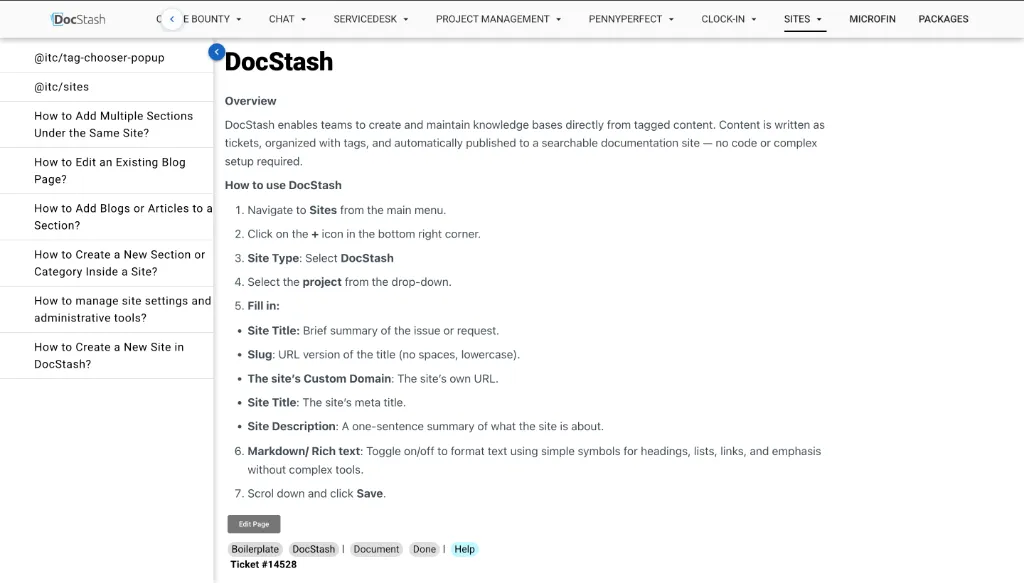
Dedicated 3-Pane Full-Viewport Reading EngineDesigned an isolated documentation layout with collapsible navigation trees, wide table viewports, and distraction-free typography.
Before
Disorientation in Dense Multi-Section Ticket DocsReaders had to scroll endlessly through lengthy incident post-mortems and resolutions without knowing document structure.
After
Real-Time DOM-Scanned 'On This Page' TOCEngineered a reactive parser extracting H2/H3 anchors with live IntersectionObserver scroll tracking for instant sub-section jumping.
Before
XSS Risks & Broken Styles from Raw Server HTMLRendering raw auto-generated HTML responses directly risked script injection and leaked un-scoped CSS into host applications.
After
Safe HTML Parsing & Scoped Typography EngineConstructed an in-browser sanitization pipeline that strips unsafe attributes and applies clean typography to code blocks and tables.
Stack
FrontendQuasar Framework (v2)Vue.js (v3) + TypeScriptPinia (State Management)Vue Router (v4)HTML DOM Parser & SanitizerIntersectionObserver API (ScrollSpy)
BackendREST API Data Extraction GatewaysTicket Auto-Response Ingestion
DevOpsVite Build SystemGit & GitHub
Security
- Client-side HTML sanitization preventing injection of unsafe inline scripts or unauthorized external embeds.
- Defensive error boundaries displaying fallback alerts if auto-generated ticket data contains malformed markup.
- Pinia-persisted reading preferences (theme, font scaling, collapsed sidebar state) stored across browser sessions.
Roadmap
- One-click export of previewed documents to PDF and Markdown format.
- Inline diff viewer comparing original ticket thread logs against the auto-generated documentation.
- Collaborative comment annotations on specific paragraphs within the preview viewport.
Executive Summary
Docstach is an enterprise documentation engine engineered to convert raw customer support ticket data, incident logs, and resolution threads into standardized, interactive knowledge documentation. While the backend handles ticket aggregation and AI/templated response generation, I engineered the entire frontend UI and document preview architecture using the Quasar Framework (Vue 3) and TypeScript.
The preview interface provides a dedicated viewing experience with multi-level nested navigation, a safe HTML document parser, and a real-time ‘On This Page’ Table of Contents that tracks reading progress.
Architecture
Frontend Preview Engine Topology
flowchart TB
    subgraph Ticket_Source ["Backend Data Layer"]
        RAW_TICKETS["Raw Support Ticket Data<br/>(Threads, Logs, Statuses)"]
        GEN_ENGINE["Auto-Response Generator<br/>(Structured HTML Output)"]
        RAW_TICKETS --> GEN_ENGINE
    end

    subgraph Quasar_Frontend ["Docstach Frontend (Quasar / Vue 3 / TypeScript)"]
        STORE["Docstach Pinia Store<br/>(Active Document, Nav Tree, View State)"]

        subgraph Preview_Layout ["Dedicated Document Preview Layout"]
            NESTED_NAV["Left Pane:<br/>Nested Navigation Tree<br/>(Categories, Tickets, Chapters)"]

            subgraph Center_Pane ["Center Reading Pane"]
                PARSER["HTML Parser & Sanitizer<br/>(Scoped Typography & Tables)"]
                DOC_BODY["Interactive Document Body<br/>(Injected Anchor Targets)"]
                PARSER --> DOC_BODY
            end

            TOC["Right Pane:<br/>'On This Page' Sub-Nav<br/>(IntersectionObserver ScrollSpy)"]
        end
    end

    GEN_ENGINE -->|"JSON Payload with HTML"| STORE
    STORE --> NESTED_NAV
    STORE --> PARSER
    DOC_BODY -->|"Scanned Headings (H2/H3)"| TOC
Visual Workflows & Document Preview Interface
Dedicated 3-Pane Document Preview Interface
![Docstach Document Preview Interface [desktop]](/images/projects/docstach/preview.webp#desktop)
Core Technical Decisions
Decision 1 — Dedicated Document Preview Layout vs Embedded Modal
| Problem | Displaying auto-generated ticket documents inside standard dashboard modals felt cramped, prevented deep-linking to sections, and lacked sufficient width for wide financial and technical tables. |
| Decision | Designed an independent Document Preview Layout in Quasar with collapsible sidebars, clean typography margins, and full viewport height utilization. |
| Outcome | Provided readers with a focused, book-like reading experience while maximizing horizontal space for dense tabular ticket logs. |
Decision 2 — DOM-Scanned ‘On This Page’ Section Navigation
| Problem | Auto-generated ticket documentation can span thousands of words across dozens of technical subheadings; readers needed instant jumping without requiring the server to calculate heading offsets. |
| Decision | Implemented a client-side heading parser in Vue 3 that traverses the rendered .doc-body DOM, collects <h2> and <h3> tags, creates sluggified anchor IDs, and binds an IntersectionObserver to highlight the active section in real time. |
| Outcome | Zero backend overhead for table of contents generation and effortless navigation across lengthy technical incident summaries. |
Decision 3 — Safe HTML Body Parsing & Scoped Typography
| Problem | Ingesting raw HTML generated from ticket histories risked CSS bleed (destroying layout styles) and potential cross-site scripting if ticket threads contained unescaped inputs. |
| Decision | Constructed an HTML sanitizer and parser pipeline that strips malicious script tags and applies strict .docstach-prose scoped styling to headings, tables, blockquotes, and code snippets. |
| Outcome | 100% resilient rendering of auto-generated responses with consistent enterprise typography and complete protection against CSS leakage. |
What I Built (Personal Contributions)
- Engineered Quasar Frontend UI: Built the entire frontend interface and component architecture in Vue 3 and Quasar Framework.
- Dedicated Document Preview Layout: Designed the specialized 3-pane documentation layout isolating reading tools from administrative sidebars.
- Hierarchical Nested Navigation Tree: Created the recursive category, ticket, and chapter sidebar allowing instant traversal across ticket archives.
- ‘On This Page’ ScrollSpy Engine: Implemented DOM heading extraction and real-time scroll tracking for sub-section navigation.
- HTML Content Parser: Built the rendering and sanitization layer that transforms raw auto-generated HTML responses into responsive, beautifully styled documentation.
Case closed
More work.