Learning & Assessment · Completed · Proprietary
SuperCards Quiz – Internal Learning & Assessment Platform
Architected an embedded internal assessment and quiz platform across 4 user journeys and 11 modular components, enabling AI-assisted question generation and timed test runs via Quasar (Vue 3) and OpenAI GPT-4o integration.
Overview
Delivered a production-ready internal assessment platform across 4 end-to-end user journeys (Create, Author, Discover, Participate) [X] spanning 15 dedicated Vue files and 11 composable components [Y], by refactoring the Quiz module into an isolated Pinia state architecture with OpenAI GPT-4o question generation and timed participation workflows [Z].
Decisions
Organizations running knowledge checks through spreadsheets, external quiz tools, or ad-hoc forms had no way to tie assessments to their existing project and people data. Authors could not see who participated, how teams scored, or whether content was ready to publish. Employees had no single place to discover available quizzes, track their own scores, or review mistakes after submission.
Challenge
Quizzes needed rich metadata (status, category, time limit, instructions, cover image) without building a separate content entity.
Decision
Modeled quizzes as SuperCards task cards with entity tags (Quiz), status tags (Draft / Published / Unpublished), category tags (Quiz Category), and meta fields (time, quiz_instructions).
Outcome
Authors reuse the platform's card creation dialog, tag system, and detail shell — quiz-specific logic stays in the Quiz module only.
Challenge
Authoring UI was growing into an unmaintainable single file with mixed concerns (validation, AI, existing questions, new questions, cover upload).
Decision
Split into focused components: QuizQuestionForm (authoring + validation + AI), ExistingQuestionsList (collapsible edit/delete), QuizCard (dual studio/challenge modes), and thin orchestration pages.
Outcome
Each component owns one concern; studio page wires them together via events and store actions.
Challenge
Participants needed a guided, timed experience with post-submission review — not just a static form.
Decision
Built a four-phase attend flow (intro → questions → results → mistake review) with countdown timer, progress bar, and auto-submit on timeout.
Outcome
Employees get a structured assessment experience comparable to dedicated quiz apps, without leaving SuperCards.
Challenge
Authors starting from scratch on question banks was slow and error-prone.
Decision
Integrated OpenAI question generation with configurable MCQ/fill-blank counts, preview dialog, and one-click injection into the authoring form.
Outcome
Empty quizzes can be bootstrapped in seconds; authors review and edit AI output before publishing.
Before → after
Enterprise People Ops, Training Coordinators & Internal Knowledge Leads
Before
Fragmented External Quiz Tools (Google Forms / Typeform)Running assessments on external survey tools disconnected test scores from employee employee work profiles and project teams.
After
Embedded Native Learning Surface in SuperCardsDirectly transformed the platform's universal card model into timed quizzes, associating assessment results with real employee profiles.
Before
Slow Manual Question Bank Creation for AuthorsTraining coordinators spent hours manually formatting multiple-choice options and fill-in-the-blank text inputs.
After
AI-Powered Question Studio (OpenAI GPT-4o)Integrated automated question generation that creates structured MCQ banks from course titles in seconds for author review.
Before
Lack of Immediate Feedback & Mistake WalkthroughsTraditional quiz forms showed binary pass/fail grades without allowing employees to inspect correct answers and explanations.
After
Post-Submission Mistake Review EngineEngineered an interactive review screen showing correct explanations, highlighted answer differences, and grade score badging.
Stack
FrontendVue 3 (Composition API)Quasar Framework (v2)TypeScriptPinia (quiz-store)md-editor-v3 / q-editor
BackendLaravel REST API (quizbuilder service)Card & Tag Meta-Field SystemOpenAI GPT-4o-mini Integration
DevOpsVite Build SystemQuasar CLIGit & GitHub
Security
- All quiz routes require authentication (requiresAuth: true).
- Studio lists filter by owner; challenge page only surfaces Published quizzes.
- Question attachments use bearer-token headers via MediaManager; cover images use dedicated quiz_cover_attachment collection.
- Submission payload normalizes MCQ answer IDs and fill-in-the-blank strings before API post to prevent type mismatches.
Roadmap
- Timed quiz anti-cheat (tab-switch detection, question shuffle).
- Certificate generation on passing threshold.
- Admin analytics dashboard across all quizzes and departments.
- Bulk import/export of question banks.
Executive Summary
The SuperCards Quiz module is an internal learning and assessment platform embedded inside the broader SuperCards enterprise workspace. Rather than standing up a separate LMS, the module extends the platform’s card-based data model — every quiz is a task card tagged as a Quiz entity, categorized by section, and governed by a Draft → Published → Unpublished lifecycle.
I fully refactored this module from a tangled set of pages into a clean, modular architecture:
- 4 route-level pages orchestrating distinct user journeys
- 11 dedicated components each owning a single UI concern
- 1 Pinia store (
quiz-store) with typed API actions - 1 service layer (
quizService.js) against thequizbuilderbackend
The refactor preserved deep integration with platform primitives (TaskDetails, PreviewWindow, tag store, media manager) while isolating all quiz-specific logic inside src/modules/quiz/.
Architecture
Module Structure
src/modules/quiz/
├── routes.js                    # 4 authenticated routes under /quiz
├── index.js
├── pages/
│   ├── QuizIndex.vue            # Quick quiz creation entry
│   ├── QuizStudioIndex.vue      # Author workspace (full CRUD)
│   ├── ChallengeYourselfIndex.vue  # Employee discovery & browse
│   └── AttendQuiz.vue           # Timed participation flow
└── components/
    ├── QuizCard.vue             # Dual-mode card (studio / challenge)
    ├── QuizQuestionForm.vue     # Authoring, validation, AI generation
    ├── ExistingQuestionsList.vue # Collapsible edit/delete for saved Qs
    ├── QuizQuestionsDisplay.vue # Live question UI during quiz
    ├── StartQuiz.vue            # Pre-quiz intro screen
    ├── QuizResult.vue           # Score summary & grade badge
    ├── ReviewAnswers.vue        # Post-submission mistake walkthrough
    └── QuizParticipants.vue     # Participant analytics popover
System Topology
flowchart TB
    subgraph Author ["Author Journey"]
        STUDIO["Quiz Studio Page"]
        QFORM["QuizQuestionForm"]
        EXIST["ExistingQuestionsList"]
        TD["TaskDetails (shared)"]
        STUDIO --> QFORM
        STUDIO --> EXIST
        STUDIO --> TD
    end

    subgraph Participant ["Participant Journey"]
        CHALLENGE["Challenge Yourself Page"]
        ATTEND["Attend Quiz Page"]
        START["StartQuiz"]
        DISPLAY["QuizQuestionsDisplay"]
        RESULT["QuizResult"]
        REVIEW["ReviewAnswers"]
        CHALLENGE --> ATTEND
        ATTEND --> START --> DISPLAY --> RESULT --> REVIEW
    end

    subgraph Shared ["Shared Layer"]
        CARD["QuizCard"]
        STORE["quiz-store (Pinia)"]
        API["quizService → quizbuilder API"]
        TAGS["tag-store (status, category)"]
        TASK["task-store (card CRUD, media)"]
        AI["openAIService (GPT-4o-mini)"]
    end

    STUDIO --> CARD
    CHALLENGE --> CARD
    QFORM --> AI
    STORE --> API
    STUDIO --> STORE
    ATTEND --> STORE
    STUDIO --> TAGS
    STUDIO --> TASK
    QFORM --> TASK
Client-to-Cloud Flow
flowchart LR
    UI["Quiz UI Components"] --> STORE["quiz-store"]
    STORE --> SVC["quizService.js"]
    SVC --> API["Laravel quizbuilder API"]
    API --> DB[("PostgreSQL")]

    UI --> TASKSTORE["task-store"]
    TASKSTORE --> CARDS["cards API (create/update/media)"]

    UI --> TAGSTORE["tag-store"]
    TAGSTORE --> TAGSAPI["tags API (Draft/Published/Unpublished)"]

    QFORM["QuizQuestionForm"] --> OPENAI["OpenAI Chat Completions"]
User Journeys
1. Quiz Creation (/quiz/quizzes)
A lightweight entry point where authors create a new quiz card via the platform’s shared creation dialog. On submit, the system tags the card as a Quiz entity type with category and difficulty settings.
![Create New Quiz Dialog [desktop]](/images/projects/quiz/create-quiz-dialog.webp#desktop)
2. Challenge Yourself — Assessment Discovery (/quiz/challenge-yourself)
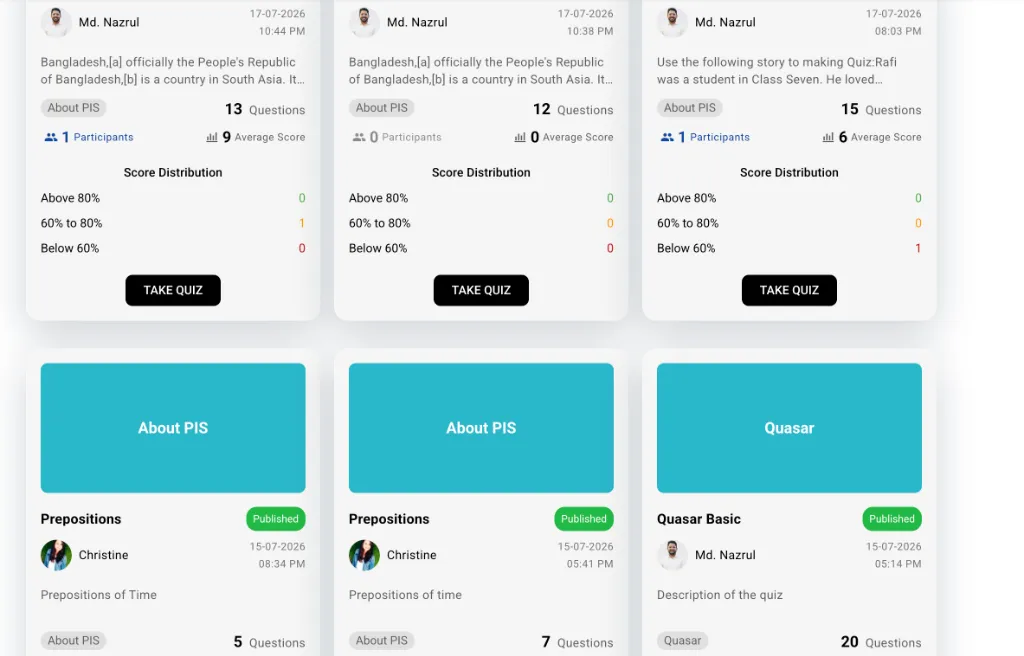
The employee-facing catalog of available assessments. Employees can browse published quizzes by category tabs, search by title, and inspect score distributions.
![SuperCards Quiz Challenge Yourself Catalog [desktop]](/images/projects/quiz/challenge-cards-grid.webp#desktop)
3. Attend Quiz — Timed Participation (/quiz/attend-quiz/:id)
A structured assessment experience with clear pre-quiz instructions, countdown timers, progress bars, and instant submission.
![Quiz Instructions & Pre-Test View [desktop]](/images/projects/quiz/attend-quiz-intro.webp#desktop)
![Active Timed Assessment with Progress & MCQ Questions [desktop]](/images/projects/quiz/attend-quiz-active.webp#desktop)
stateDiagram-v2
    [*] --> Intro: Load questions
    Intro --> Active: Start Quiz (timer begins)
    Active --> Active: Next / Previous question
    Active --> Results: Submit or timeout
    Results --> Review: Review Mistakes
    Review --> Results: Finish Review
Results --> [*]: Back To Challenges| Phase | Component | Behavior |
|---|---|---|
| 1 — Intro | StartQuiz |
Shows question count, time limit, instructions |
| 2 — Active | QuizQuestionsDisplay |
Progress bar, countdown timer, MCQ radio/checkbox or fill-blank inputs, prev/next navigation |
| 3 — Results | QuizResult |
Percentage score, grade badge (Excellent / Average / Below Average), correct/incorrect breakdown |
| 4 — Review | ReviewAnswers |
Walk through each question showing user answer vs correct answer with color-coded feedback |
Timer logic: Countdown from quiz meta time (minutes); auto-submits and advances to results on expiry.
Submission: Normalizes MCQ answers as ID arrays and fill-blank answers as trimmed string arrays before posting to quizbuilder/startQuiz.
6. Quiz Card — Dual-Mode Component (QuizCard)
A single reusable card component serving both author and participant contexts via a mode prop:
| Feature | mode="studio" |
mode="challenge" |
|---|---|---|
| Primary Action | Preview (opens studio panel) | Take Quiz / Retake Quiz |
| Status Badge | Clickable (toggle Published/Unpublished) | Read-only |
| Score Badge | Hidden | Shows “My Score: X%” |
| Analytics | Participant count (opens menu) | Average score display |
| Score Distribution | Above 80% / 60–80% / Below 60% | Same |
Participant popover: Clicking participant count opens QuizParticipants — searchable, sortable list with top score, average, and attempt count per user.
Data Model
Quizzes are not a separate database entity. They are SuperCards task cards enriched with:
| Layer | Field / Tag | Purpose |
|---|---|---|
| Entity Tag | Quiz (Entity Type category) |
Identifies card as a quiz |
| Status Tag | Draft / Published / Unpublished |
Lifecycle control |
| Category Tag | Quiz Category tags | Section grouping (e.g. HR, Engineering) |
| Meta | time |
Quiz duration in minutes |
| Meta | quiz_instructions |
Rich HTML instructions shown before start |
| Media | quiz_cover_attachment |
Card cover image |
| Media | quiz_question_attachment |
Per-question images |
| API | quiz_details |
Aggregated stats (total questions, participants, score breakdown) |
Questions live in the quizbuilder service as separate records linked by quiz_card_id.
API Surface (quizService.js)
| Method | Endpoint Pattern | Used For |
|---|---|---|
getAllQuiz |
quizbuilder/quizList |
Card grid lists (with quizCardList view header) |
create |
quizbuilder/quiz |
Batch question creation |
getQuestionsByQuizId |
quizbuilder/quiz/answers?quizId= |
Load questions for studio + attend |
updateQuestion |
PATCH quizbuilder/quiz/:id |
Edit existing question |
deleteQuestion |
DELETE quizbuilder/quiz/:id |
Remove question |
submitAnswers |
POST quizbuilder/startQuiz |
Participant submission |
getParticipants |
quizbuilder/participantHistory/:quizId |
Participant analytics |
Refactor Summary — What Changed
Structural
- Extracted 11 components from monolithic page logic
- Introduced dedicated
quiz-storewith 8 typed actions (create, fetch, update, delete, submit, participants) - Centralized HTTP in
quizService.jswith consistentquizbuilderresource naming - Each page is a thin orchestrator — route params, store calls, event wiring only
UX
- Studio preview panel replaces full-page navigation for editing
- Deep link support (
?card_id=) for sharing quiz edit URLs - Scroll-into-view with highlight when selecting a card
- Collapsible existing questions with search and expand-all
- Four-phase attend flow with timer, progress, and mistake review
- AI question generation with preview-before-apply workflow
Technical
- Validation moved to reactive computed error getters (not inline template checks)
- Question type switching resets form state via watchers (MCQ ↔ fill-blank)
- Answer type switching normalizes correctAnswers (single radio ↔ multi checkbox)
- Submission payload type-normalizes MCQ IDs and fill-blank strings
ReviewAnswershandles multiple API response shapes via candidate field normalization
Case closed
More work.