Mobile Hardware & IoT · Active Production (v1.0.5) · Proprietary
Inventory Management – Mobile Warehouse & Barcode Automation
Engineered an Android warehouse inventory companion achieving sub-second barcode intake and misplaced stock resolution across shelf locations via Google ML Kit continuous batch scanning, Capacitor Camera, and atomic Supabase RPCs.
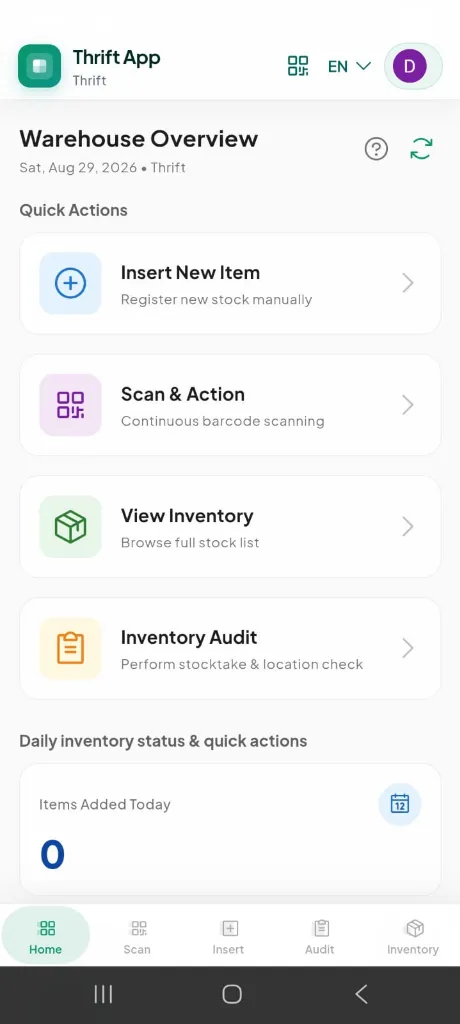
Overview
Engineered the mobile warehouse companion for TradeflowBD's Thrift vertical — replacing paper-based stock checks and desktop-only registration with a Capacitor Android app featuring Google ML Kit barcode scanning, continuous batch queue operations, shelf/box audit with misplaced-item detection, bilingual operator UI, and atomic Supabase RPC registration that syncs instantly to the web admin dashboard via TanStack Query cache invalidation.
Decisions
Warehouse staff registering second-hand garments on a desktop ERP could not keep up with inbound shipment volume. Paper stock checks caused miscounts, misplaced items sat undetected for weeks, and barcode lookup required walking back to a PC.
Challenge
Unreliable Barcode Scanning in Warehouse Conditions
Decision
Integrated @capacitor-mlkit/barcode-scanning with Google ML Kit on Android, auto-installing the scanner module on first use, with a camera overlay fallback when the native scan UI fails.
Outcome
Reliable Code-128 reads on thermal labels with permission handling, auto-zoom, and normalized barcode parsing.
Challenge
High-Volume Intake During Shipment Processing
Decision
Built continuous scan mode with a bulk action queue — operators scan many items in sequence, then batch-update shelf location or stock status in one RPC call.
Outcome
Eliminated per-item form navigation during peak intake; bulk operations use bulk_update_thrift_stock_locations and bulk_update_thrift_stock_statuses RPCs.
Challenge
Stock Discrepancies Across Shelf/Box Locations
Decision
Designed Audit Mode — select a shelf/box, load expected items, scan to verify, flag missing items, detect misplaced stock via live barcode lookup, and relocate in bulk.
Outcome
Structured stocktake workflow with progress tracking, audio/haptic feedback, and one-tap bulk relocation for misplaced items.
Challenge
Operator UX in Noisy Warehouse Environments
Decision
Added audio chimes (success/error tones) and device vibration via scanFeedback utilities, plus contextual AppHelpDialog guides on every major workflow.
Outcome
Operators get instant scan confirmation without looking at the screen.
Challenge
Desktop-Only Registration Bottleneck
Decision
Mobile stock registration captures barcode, product photo (Capacitor Camera), metadata (brand, size, condition, weight, pricing), and registers atomically via register_thrift_stock_from_app RPC with Cloudinary image upload.
Outcome
Full garment intake at the warehouse shelf — data appears in TradeflowBD web admin immediately on cache refresh.
Before → after
Warehouse Operators, Floor Managers & Second-Hand Retail Logistics Teams
Before
Desktop-Tethered Registration BottlenecksFloor operators had to haul garments to desktop PCs or hand-write paper intake sheets, causing massive intake delays during container arrivals.
After
On-Floor Mobile Registration with Photo UploadCapacitor 8 Android app captures product photos directly via Capacitor Camera, uploads to Cloudinary CDN, and registers inventory in sub-seconds.
Before
Undetected Misplaced Stock & Phantom Out-of-StocksGarments placed on incorrect shelf/box bins went unnoticed for weeks, showing as unavailable for sale while physically in the warehouse.
After
Structured 3-State Shelf & Bin Audit ModeOperators scan boxes to verify expected stock, immediately detect misplaced items via live DB queries, and relocate them with one-tap atomic RPCs.
Before
Slow Single-Item Scanning & Form Navigation FatigueScanning barcode labels one-by-one with mandatory screen confirmation caused high operator fatigue and slow intake rates.
After
Google ML Kit Continuous Batch Queue ScanningHardware-accelerated continuous camera decoding with audio/haptic feedback queues dozens of scans for instant bulk location/status updates.
Before
Language Barrier for Warehouse Floor StaffComplex English ERP interfaces caused operator misclassification and required extensive supervision.
After
Bilingual Operator Interface (English + Bengali)Complete high-contrast bilingual localization (বাংলা + EN) with persisted device locale and large touch targets designed for warehouse floors.
Stack
FrontendQuasar Framework (v2)Vue.js (v3) + TypeScriptCapacitor 8 (Android)TanStack Query (Vue Query)Vue I18n (English + Bengali)
Mobile@capacitor-mlkit/barcode-scanning (Google ML Kit)@capacitor/camera (Product Photo Capture)Native Haptic & Audio Scan Feedback@capgo/capacitor-social-login (Native Google Auth)
BackendSupabase (PostgreSQL + Auth + RPCs)Cloudinary (Direct Image Upload via Edge Function)
DatabasePostgreSQL (thrift_stocks, thrift_barcodes, thrift_shipments)Atomic RPCs (register_thrift_stock_from_app, bulk_update_*)
DevOpsCapacitor Android Release Builds (APK/AAB)Quasar Vite SPA (Web + Native from one codebase)
Security
- Supabase Auth with native Google Sign-In on Android (ID token) and browser OAuth on web.
- Tenant-scoped session bootstrap with membership validation before any stock operation.
- Atomic RPC for stock registration — no partial writes across thrift_stocks, thrift_barcodes, and thrift_stock_images.
- Duplicate image detection per barcode/shipment before Cloudinary upload.
- TanStack Query cache invalidation keeps stock list, detail, and dashboard metrics consistent after every mutation.
Roadmap
- Offline-first IndexedDB queue for warehouse zones with poor connectivity.
- Bluetooth thermal printer integration for on-the-spot barcode label printing.
- Supabase Realtime subscriptions for live dashboard push (currently poll + cache invalidation).
- iOS Capacitor build with equivalent ML Kit barcode support.
Thrift App — Case Study
Role: Full-Stack Mobile Developer
Timeline: 2025 — Present
Status: Active Production (v1.0.5)
Parent Platform: TradeflowBD — Thrift Vertical
Repo: github.com/marceldavidbaroi
At a Glance
| What it is | Mobile warehouse companion for second-hand / thrift retail inventory |
| Who it’s for | Warehouse operators registering inbound garments and performing shelf audits |
| Core problem | Desktop-only stock registration and paper stock checks can’t keep up with shipment intake |
| How it’s built | Quasar + Capacitor 8 Android app → Supabase RPCs + Cloudinary images |
| Relationship | Mobile field app for the Thrift vertical inside TradeflowBD ERP |
The Problem
TradeflowBD’s Thrift vertical handles second-hand garment retail — inbound consignment shipments, unique SKU barcodes, garment measurements, landed costing, POS sales, and returns. The web admin (/:slug/app/thrift/*) covers the full lifecycle, but warehouse floor work exposed critical gaps:
Pain points on the warehouse floor
flowchart TD
    subgraph Before ["Before: Floor Operations"]
        A["Inbound shipment boxes arrive"] --> B["Walk to desktop PC"]
        B --> C["Register item one-by-one in web admin"]
        C --> D["Print barcode label separately"]
        D --> E["Paper stocktake sheets"]
        E --> F["Manual shelf reconciliation days later"]
        F --> G["Misplaced items discovered at POS checkout"]
end| Pain Point | Business Impact |
|---|---|
| Desktop-bound registration | Operators leave the shelf to use a PC — slows intake to ~2–3 items/minute |
| No mobile barcode lookup | Finding an item’s status requires logging into the web admin |
| Paper stock audits | Human error in counting; no real-time discrepancy detection |
| Misplaced stock invisible | Items scanned at wrong shelf/box sit undetected until a sale fails |
| English-only UI | Bangladeshi warehouse staff need Bengali labels for daily workflows |
| No scan feedback | In noisy warehouses, operators can’t tell if a scan succeeded without checking the screen |
The core question
How do you let warehouse staff register garments, scan barcodes, audit shelves, and fix misplaced stock — all from a phone at the shelf — while keeping the TradeflowBD web admin in sync?
The Solution
Thrift App is a Capacitor Android companion (also runs as a responsive web SPA) that connects to the same Supabase backend as TradeflowBD’s Thrift vertical. It handles the warehouse-floor workflows the web admin was never designed for.
Five core workflows
flowchart LR
    subgraph Mobile ["Thrift App (Warehouse Floor)"]
        INSERT["Insert Stock<br/>Select shipment + box"]
        REGISTER["Register Stock<br/>Barcode + photo + metadata"]
        SCAN["Scan & Action<br/>Lookup / move / status"]
        AUDIT["Audit Mode<br/>Shelf/box stocktake"]
        LIST["Stock List<br/>Search + filter + bulk actions"]
    end

    subgraph Backend ["Supabase (Shared with TradeflowBD)"]
        RPC["Atomic RPCs"]
        DB["thrift_stocks<br/>thrift_barcodes<br/>thrift_shipments"]
    end

    subgraph Web ["TradeflowBD Web Admin"]
        ADMIN["Thrift Stock Page<br/>POS / Reports / Tag Print"]
    end

    INSERT --> REGISTER
    REGISTER --> RPC
    SCAN --> RPC
    AUDIT --> RPC
    LIST --> RPC
    RPC --> DB
DB --> ADMIN| Workflow | Route | What it does |
|---|---|---|
| Dashboard | / |
Daily KPIs (items added today, total inventory, available stock) + quick action tiles |
| Insert Stock | /insert-stock |
Pick active shipment and box context for intake session |
| Register Stock | /register-stock |
Scan/create barcode, capture product photo, enter metadata, register via RPC |
| Scan & Action | /scan-barcode |
Single or continuous scan → lookup, move shelf, change status, bulk queue |
| Audit Mode | /audit-mode |
Shelf/box stocktake with verified / missing / misplaced detection |
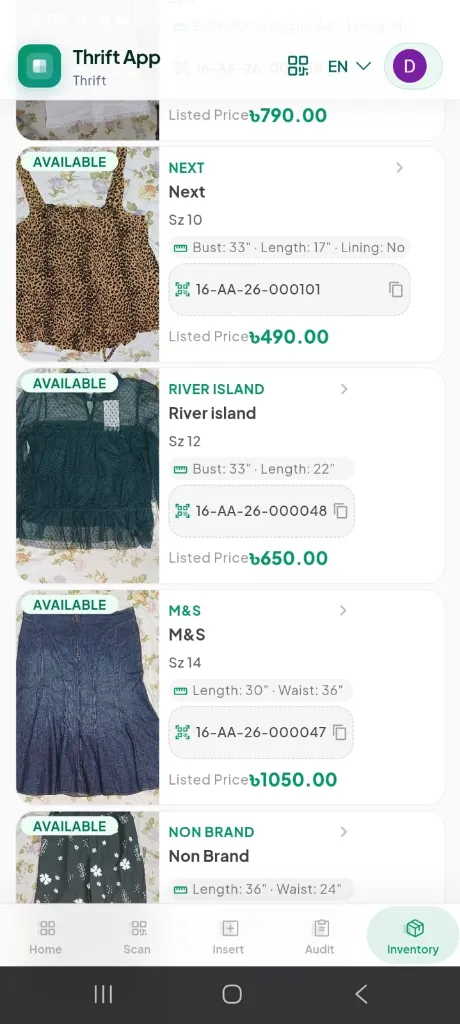
| Stock List | /stock-list |
Searchable inventory with status, condition, shelf/box filters |
Architecture
System design
flowchart TB
    subgraph Device ["Android Device / Mobile Browser"]
        UI["Quasar Vue 3 UI"]
        MLKIT["Google ML Kit<br/>Barcode Scanner"]
        CAM["Capacitor Camera<br/>Product Photos"]
        FEEDBACK["Audio + Haptic<br/>Scan Feedback"]
        I18N["Vue I18n<br/>EN + BN"]
    end

    subgraph State ["Client State"]
        TQ["TanStack Query<br/>Cache + Invalidation"]
        PINIA["Pinia<br/>Auth + Locale"]
    end

    subgraph Cloud ["Cloud Services"]
        SB["Supabase<br/>Auth + PostgreSQL + RPCs"]
        CL["Cloudinary<br/>Image Storage"]
        EDGE["Supabase Edge Function<br/>Signed Upload URL"]
    end

    subgraph Ecosystem ["TradeflowBD Ecosystem"]
        WEB["Web Admin<br/>Thrift Module"]
    end

    UI --> MLKIT & CAM & FEEDBACK & I18N
    UI --> TQ & PINIA
    TQ --> SB
    CAM --> EDGE --> CL
    SB --> WEB
Mobile build pipeline
flowchart LR
    CODE["Quasar SPA<br/>src/"] --> BUILD["quasar build<br/>-m capacitor -T android"]
    BUILD --> SYNC["cap sync android"]
    SYNC --> APK["Release APK/AAB<br/>com.brandwala.thriftapp"]
    APK --> DEVICE["Warehouse Android Devices"]
Barcode Scanning Architecture
The scanning layer uses a dual-strategy approach for reliability across Android devices.
flowchart TD
    START["Operator taps Scan"] --> PERM{"Camera<br/>permission?"}
    PERM -- Denied --> ERR["Show error notification"]
    PERM -- Granted --> ML{"Google ML Kit<br/>module installed?"}
    ML -- No --> INSTALL["Install module<br/>with progress UI"]
    INSTALL --> NATIVE
    ML -- Yes --> NATIVE["Native Scan UI<br/>BarcodeScanner.scan()"]
    NATIVE -- Success --> NORM["normalizeScannedBarcode()"]
    NATIVE -- Fail --> OVERLAY["Camera Overlay Fallback<br/>BarcodeScanner.startScan()"]
    OVERLAY --> NORM
    NORM --> LOOKUP["Supabase barcode lookup"]
    LOOKUP --> FEEDBACK["Audio chime + vibration"]
Scan modes
| Mode | Behavior | Use Case |
|---|---|---|
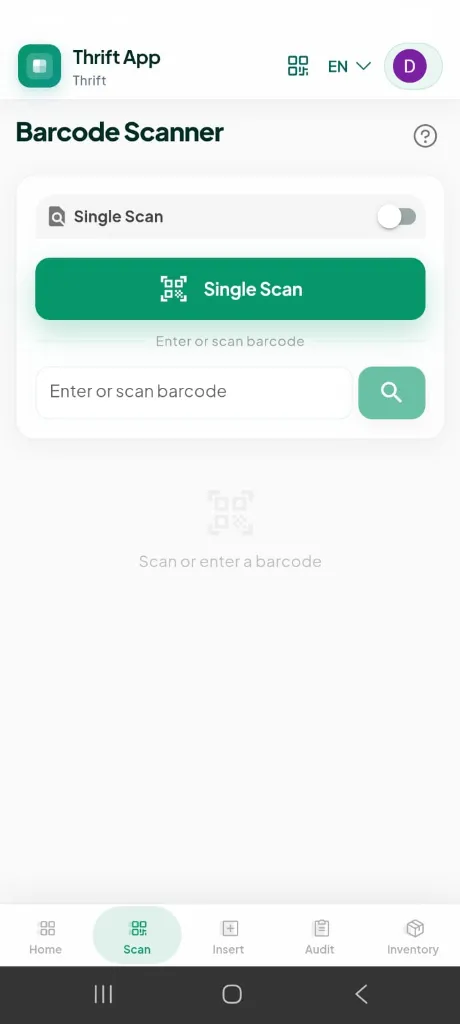
| Single Scan | Scan → show item detail card → action (move, status change) | One-off lookup or correction |
| Continuous Scan | Scan repeatedly → items queue up → batch move or batch status update | High-volume intake or bulk corrections |
Scan feedback system
Success → 880Hz double-tone chime + 80ms vibration
Error   → 220Hz sawtooth beep + [100, 50, 100]ms vibration pattern
Operators get instant confirmation without looking at the screen — critical in noisy warehouse environments.
Audit Mode — Stocktake Workflow
The most operationally impactful feature. Replaces paper stock checks with a structured digital workflow.
flowchart TD
    A["Select Shelf + Box"] --> B["Load expected items<br/>from database"]
    B --> C["Start audit session"]
    C --> D["Scan barcode"]
    D --> E{"Match expected<br/>list?"}
    E -- Yes --> F["Mark VERIFIED<br/>✓ success feedback"]
    E -- No --> G{"Exists in DB<br/>different location?"}
    G -- Yes --> H["Flag MISPLACED<br/>⚠ warning feedback"]
    G -- No --> I["Mark UNKNOWN<br/>✗ error feedback"]
    F & H & I --> J{"More items?"}
    J -- Yes --> D
    J -- No --> K["Review summary<br/>Verified / Missing / Misplaced"]
    K --> L["Bulk relocate misplaced items"]
    K --> M["End audit session"]
Discrepancy types
| Status | Meaning | Action |
|---|---|---|
| VERIFIED | Scanned item matches expected shelf/box | Auto-marked on scan |
| MISSING | Expected item not scanned during session | Flagged in summary |
| MISPLACED | Item exists in DB but at wrong shelf/box | One-tap or bulk relocate to current audit location |
Stock Registration Flow
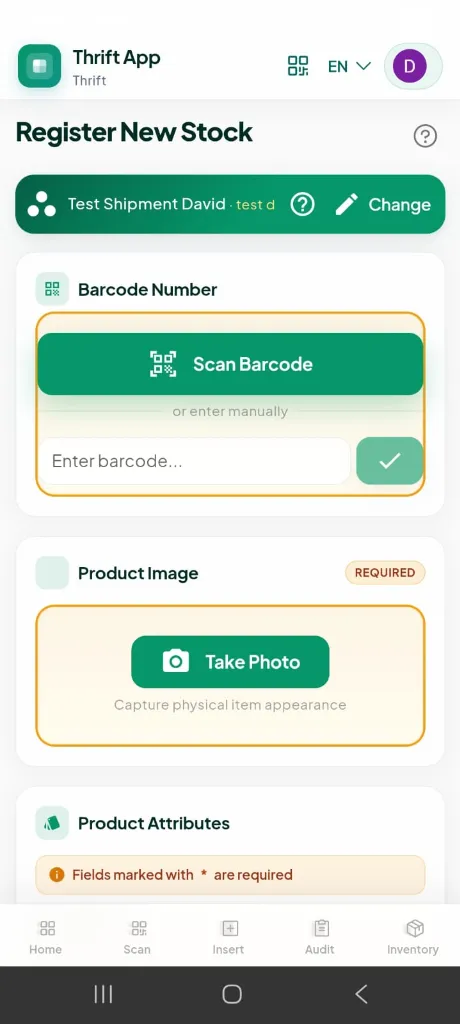
Full garment intake at the warehouse shelf — no desktop required.
sequenceDiagram
    participant Op as Warehouse Operator
    participant App as Thrift App
    participant Cam as Capacitor Camera
    participant CL as Cloudinary
    participant RPC as Supabase RPC
    participant Web as TradeflowBD Web Admin

    Op->>App: Select shipment + box context
    Op->>App: Scan or enter barcode
    App->>RPC: Check barcode availability
    Op->>Cam: Capture product photo
    Cam-->>App: Base64 image
    App->>CL: Upload to shipment folder
    CL-->>App: secure_url
    Op->>App: Enter brand, size, condition, weight, price
    App->>RPC: register_thrift_stock_from_app()
    RPC->>RPC: Create stock + link barcode + save image
    RPC-->>App: stock_id
    App->>App: Invalidate TanStack Query caches
    Note over Web: Web admin stock list<br/>refreshes on next query
Registration captures
- Barcode (scanned or manual)
- Product photo (camera with optional crop/edit)
- Brand, category, type, color, size, condition
- Shelf and box location
- Product weight + extra weight (for landed cost apportionment)
- Origin unit price + listed sell price
- Shipment and box context (auto-linked)
Data Sync Strategy
Note: The app does not use Supabase Realtime WebSocket channels. Sync is achieved through TanStack Query cache invalidation after every mutation.
flowchart LR
  MUTATION["Stock mutation<br/>(register, move, status)"] --> RPC["Supabase RPC"]
  RPC --> INVALIDATE["Invalidate query keys<br/>thrift/stock-list<br/>thrift/stock-detail<br/>thrift/dashboard"]
  INVALIDATE --> REFETCH["Next page load or<br/>manual refresh pulls fresh data"]
REFETCH --> WEB["TradeflowBD web admin<br/>sees updated stock"]| Query Key | Data | Invalidated On |
|---|---|---|
thrift/stock-list |
Paginated inventory | Register, update, bulk move, bulk status |
thrift/stock-detail/:id |
Single item detail | Update location, status |
thrift/dashboard |
Daily KPI metrics | Stock registration |
thrift/barcodes |
Barcode pool | Create, delete barcode |
Authentication
Dual-path auth for web and native Android.
flowchart TD
    LOGIN["Login Page"] --> PLATFORM{"Platform?"}
    PLATFORM -- Web --> OAUTH["Supabase OAuth<br/>Google redirect"]
    PLATFORM -- Android --> NATIVE["Native Google Picker<br/>@capgo/capacitor-social-login"]
    NATIVE --> IDTOKEN["signInWithIdToken()"]
    OAUTH --> CALLBACK["/auth/callback"]
    IDTOKEN --> BOOTSTRAP["bootstrapUserSession()"]
    CALLBACK --> BOOTSTRAP
    BOOTSTRAP --> MEMBER{"Valid Thrift<br/>membership?"}
    MEMBER -- Yes --> DASH["Dashboard"]
    MEMBER -- No --> DENY["Access denied → logout"]
Core Technical Decisions
Decision 1 — Google ML Kit over web-based decoders
| Problem | JavaScript barcode libraries struggle with Code-128 thermal labels in low light, at angles, and on curved garment hang-tags. |
| Decision | Use @capacitor-mlkit/barcode-scanning which wraps Google’s on-device ML Kit scanner with auto-zoom, native UI, and a camera overlay fallback. |
| Outcome | Hardware-accelerated decoding on Android with graceful degradation when the native scan UI is unavailable. |
Decision 2 — Continuous scan queue for batch operations
| Problem | Registering or relocating 50+ items during shipment intake requires scanning each item, navigating a form, and saving — far too slow. |
| Decision | Continuous scan mode builds a queue of scanned items. Operators batch-apply shelf moves or status changes via bulk_update_thrift_stock_locations and bulk_update_thrift_stock_statuses RPCs. |
| Outcome | Scan many, act once. Bulk operations complete in a single database round-trip. |
Decision 3 — Audit mode with three-tier discrepancy detection
| Problem | Paper stocktakes can’t detect items physically present but logged at the wrong shelf — the most common warehouse error. |
| Decision | Audit mode loads expected items for a shelf/box, then on each scan: match → verified, no match but exists elsewhere → misplaced (with one-tap relocate), not in DB → unknown. |
| Outcome | Structured stocktake with real-time progress bar and actionable discrepancy summary. |
Decision 4 — Atomic RPC registration, not client-side inserts
| Problem | Stock registration touches thrift_stocks, thrift_barcodes, and thrift_stock_images — partial client writes leave orphaned records. |
| Decision | Single register_thrift_stock_from_app RPC handles the full registration atomically. Image upload to Cloudinary happens first; the RPC receives the secure_url. |
| Outcome | No partial registrations. Duplicate barcode/image detection before write. |
Decision 5 — Bilingual UI for warehouse operators
| Problem | Warehouse staff in Bangladesh are more productive in Bengali, but the tech stack is English-first. |
| Decision | Full Vue I18n integration with English and Bengali (বাংলা), persisted locale preference, covering all operator-facing workflows including help dialogs. |
| Outcome | Operators use the app in their preferred language without a separate build. |
Decision 6 — Audio + haptic scan feedback
| Problem | In noisy warehouses, operators can’t hear notification sounds or see the screen while handling garments. |
| Decision | Web Audio API success/error tones + navigator.vibrate() haptic patterns triggered on every scan result via triggerScanFeedback(). |
| Outcome | Instant tactile and audio confirmation — success feels different from error without looking at the device. |
Tech Stack
| Layer | Technology | Role |
|---|---|---|
| UI Framework | Quasar 2 + Vue 3.5 + TypeScript | Mobile-first SPA, shared web + native |
| Mobile Runtime | Capacitor 8 | Android native shell, camera, haptics |
| Barcode | @capacitor-mlkit/barcode-scanning | Google ML Kit on-device decoding |
| Camera | @capacitor/camera | Product photo capture with crop/edit |
| Auth | Supabase Auth + @capgo/capacitor-social-login | Web OAuth + native Google ID token |
| Server State | TanStack Query v5 | Query caching, mutation invalidation |
| Client State | Pinia | Auth session, locale preference |
| i18n | Vue I18n v10 | English + Bengali |
| Images | Cloudinary (via Edge Function) | Shipment-scoped folder upload |
| Backend | Supabase PostgreSQL + RPCs | Shared with TradeflowBD Thrift vertical |
| Icons | Phosphor Icons | Consistent iconography |
| Build | Quasar Vite + Capacitor CLI | build:android → release APK/AAB |
Relationship to TradeflowBD
Thrift App is the mobile field layer of the TradeflowBD Thrift vertical — not a standalone product.
flowchart TB
    subgraph TradeflowBD ["TradeflowBD Platform"]
        subgraph ThriftVertical ["Thrift Vertical"]
            SHIP["Shipment Intake<br/>(Web Admin)"]
            COST["Landed Cost Engine<br/>(Web Admin)"]
            POS["POS Sales Desk<br/>(Web Admin)"]
            TAG["Barcode Tag Print<br/>(Web Admin)"]
            REPORTS["Sales Reports<br/>(Web Admin)"]
        end
    end

    subgraph ThriftApp ["Thrift App (Mobile)"]
        REG["Stock Registration"]
        SCAN["Barcode Scan & Action"]
        AUDIT["Shelf Audit"]
    end

    REG -->|"register_thrift_stock_from_app"| SHIP
    SCAN -->|"lookup + update"| SHIP
    AUDIT -->|"verify + relocate"| SHIP
    SHIP --> COST --> POS
    POS --> REPORTS
SHIP --> TAG| Layer | Runs On | Handles |
|---|---|---|
| Thrift App (mobile) | Android phone at warehouse shelf | Registration, scanning, audit, quick status/location changes |
| TradeflowBD web admin | Desktop browser | Shipment costing, POS invoicing, tag printing, returns, reports, investor yield |
What I Built
- Barcode scanning engine — ML Kit integration with module auto-install, native UI + overlay fallback, barcode normalization, and audio/haptic feedback
- Stock registration workflow — End-to-end mobile intake: barcode → photo → metadata → Cloudinary upload → atomic RPC
- Continuous scan + bulk queue — Batch shelf moves and status updates via bulk RPCs
- Audit mode — Full stocktake workflow with verified/missing/misplaced detection and bulk relocation
- Bilingual operator UI — English and Bengali across all workflows with persisted locale
- Native Android auth — Google Sign-In via ID token (no Custom Tab redirect on Android)
Visual Workflows & Mobile Wireframes
1. Mobile Warehouse Scanner & Inventory Wireframes
+-----------------------------------+    +-----------------------------------+
| [=] Thrift App  [#] [EN v]  (D)   |    | [=] Thrift App  [#] [EN v]  (D)   |
+-----------------------------------+    +-----------------------------------+
| Warehouse Overview     (?) (Sync) |    | Barcode Scanner               (?) |
| Sat, Aug 29, 2026 * Thrift        |    |                                   |
|                                   |    | [Q] Single Scan            ( o )  |
| QUICK ACTIONS                     |    | +-------------------------------+ |
| +-------------------------------+ |    | |   [#] SINGLE SCAN             | |
| | (+) Insert New Item        >  | |    | +-------------------------------+ |
| |     Register stock manually   | |    |                                   |
| +-------------------------------+ |    | Enter or scan barcode:            |
| | [#] Scan & Action          >  | |    | +--------------------------+----+ |
| |     Continuous batch scanning | |    | | 16-AA-26-000101          | [Q]| |
| +-------------------------------+ |    | +--------------------------+----+ |
| | [=] View Inventory         >  | |    |                                   |
| |     Browse full stock list    | |    | +-- SCANNED ITEM CARD -----------+|
| +-------------------------------+ |    | | [IMG] NEXT Corduroy Jacket     ||
| | [*] Inventory Audit        >  | |    | |       Sz 12 | Bust: 34" L: 22" ||
| |     Shelf & box stocktake     | |    | |       Loc: Shelf A-04 / Box 12 ||
| +-------------------------------+ |    | |       Landed: ৳2,850.00        ||
|                                   |    | +--------------------------------+|
| DAILY INVENTORY KPIs              |    |                                   |
| +-------------------------------+ |    | [ Move Shelf ]   [ Mark Damaged ] |
| | Items Added Today       [Cal] | |    |                                   |
| | 420 Pcs                       | |    |                                   |
| +-------------------------------+ |    |                                   |
+-----------------------------------+    +-----------------------------------+
| [Home]  [Scan]  [+]  [Audit] [Inv]|    | [Home]  [Scan]  [+]  [Audit] [Inv]|
+-----------------------------------+    +-----------------------------------+
        (A) Dashboard View                       (B) Scanner & Action View
2. Shelf Audit & Misplaced Item Detection Flow
flowchart TD
    subgraph ST1 ["Step 1: Session Initiation"]
        AUDIT_START["Select Warehouse Zone<br/>(e.g., Rack B / Shelf 03 / Box 14)"]
        LOAD_EXPECTED["Query Supabase for Expected SKUs<br/>(Cached via TanStack Query)"]
        AUDIT_START --> LOAD_EXPECTED
    end

    subgraph ST2 ["Step 2: Continuous ML Kit Scan Loop"]
        LOAD_EXPECTED --> SCAN_SKU["ML Kit Camera Scan / Barcode Key-in"]
        SCAN_SKU --> CHECK{"Matches expected<br/>Shelf/Box?"}

        CHECK -- Yes --> VERIFIED["VERIFIED ✓<br/>880Hz Audio Chime<br/>80ms Vibration"]
        CHECK -- No, Exists Elsewhere --> MISPLACED["MISPLACED ⚠<br/>Yellow Alert<br/>One-Tap Relocate Action"]
        CHECK -- No, Not in System --> UNKNOWN["UNKNOWN ✗<br/>220Hz Error Tone<br/>Flag for Quarantine"]
    end

    subgraph ST3 ["Step 3: Discrepancy Resolution & Sync"]
        VERIFIED & MISPLACED & UNKNOWN --> SUMMARY["Audit Summary Review<br/>(e.g., 48 Verified, 2 Missing, 1 Misplaced)"]
        SUMMARY --> RPC_RESOLVE["Trigger bulk_update_thrift_stock_locations()<br/>Invalidate TanStack Query Keys"]
        RPC_RESOLVE --> SYNCED["TradeflowBD Admin Stock Reconciled"]
    end
Future Roadmap
timeline
    title Thrift App Roadmap
    section In Progress
        Production Hardening : v1.0.5 on warehouse devices
    section Planned
        Offline Queue : IndexedDB sync for poor connectivity zones
        Thermal Printer : Bluetooth label printing at the shelf
        Supabase Realtime : Push stock changes to web admin without refresh
        iOS Build : Capacitor iOS with equivalent ML Kit support
Links
- Parent Platform: tradeflowbd.com
- GitHub: github.com/marceldavidbaroi
Thrift App — Scan at the shelf. Register on the floor. Audit with confidence. Syncs with TradeflowBD.
Case closed
More work.